r7: the gateway that remembers every request
r7 routes traffic to your services and records every exchange on local disk, with no network call
while the client waits. One routes.yaml, checked before it serves a single request.
- Every exchange on record. Headers or full bodies, chosen per route, with secrets stored as fingerprints.
- Performance you can measure. 2.3–2.9× the throughput of Spring Cloud Gateway on the same cores, and one command reproduces it.
- Extensions in plain Java. Each stage of a request has its own interface, so a filter can only change what is valid at that point.
- Configuration you can trust. Strictly validated before it serves, and a bad edit is rejected while your routes keep running.
Get started in five minutes Try the config editor
Your first gateway
All r7 needs is a routes.yaml:
routes:
  - id: api
    match:
      - PathPrefix:
          prefix: /api
    upstream:
      targets:
        - url: http://host.docker.internal:3000
    journal:
      request:
        level: HEADERS
      response:
        level: HEADERS
Start it:
(umask 077; set -C; echo "R7_FINGERPRINT_KEY=$(openssl rand -base64 32)" > .env)   # once: keep it, and keep it private
docker run --rm -p 8888:8888 -p 127.0.0.1:18888:18888 \
  --add-host=host.docker.internal:host-gateway \
  --env-file .env \
  -v "$PWD/routes.yaml:/app/config/routes.yaml:ro" \
  -v r7-journals:/journals \
  ghcr.io/ethlo/r7-gateway:main
Requests to http://localhost:8888/api/... now reach your service on port 3000, and every one of
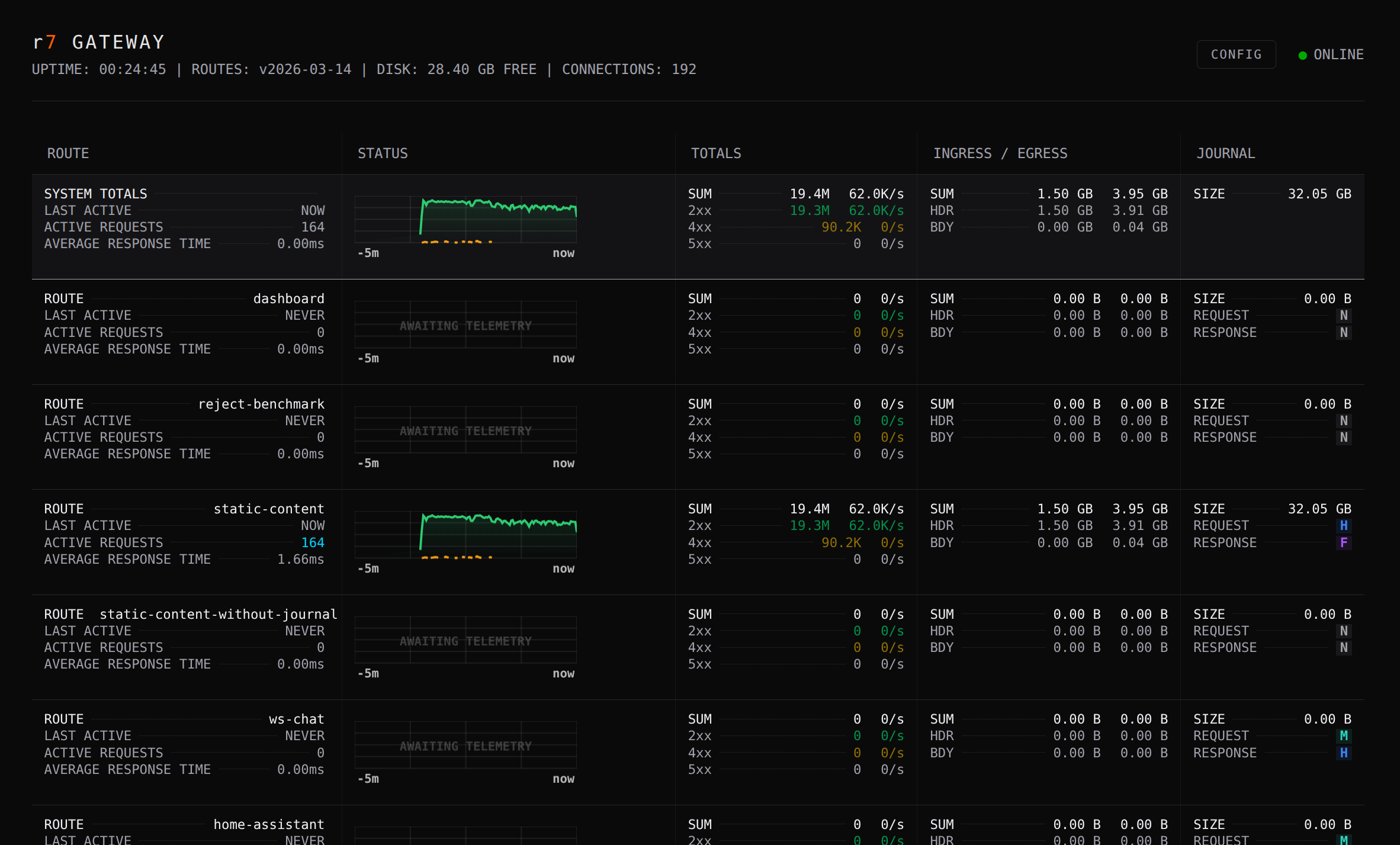
them is written with its headers to the journal, kept in the r7-journals volume. Open http://localhost:18888 to see your routes,
their upstream health, live response times and any filter that needs attention, such as an open circuit breaker.
That is the whole setup. When you need to tune ports, limits or journal storage, add a
server.yaml; until then the defaults are chosen to be safe.
What r7 does that other gateways leave to you
Every request, on the record
Most gateways log a line per request: method, path, status, timing. When a client disputes what it sent, or an incident review needs the actual payload, that line is not enough, and getting more means a mirror, a tap or a script you maintain. r7 records the exchange itself: just the essentials, the headers too, or the full bodies. You choose per route, and a rule raises the detail for the exchanges that fail:
journal:
  response:
    level: METADATA
  on_response:
    - match:
        - Status:
            include: [5xx]
      response: { level: FULL }   # keep the whole response whenever one fails
Entries are written to memory-mapped files on local disk; nothing goes over the network while the client waits. A separate tailer turns them into standard formats: JSON lines that the OpenTelemetry Collector, Vector, Fluent Bit or Promtail read as they are, and WARC, the archive format pywb and other replay tools read. Secret header and query values stay out by default: a value whose name is not on an allow-list is stored as a keyed fingerprint, so you can see that two requests carried the same token without anyone reading the token. Bodies are recorded as sent, so record them only on routes whose payloads you may keep.
How journaling works · Where r7 fits in your stack
A config that is checked before it serves
A typo in a gateway config usually shows up as a silent misroute in production. r7 refuses to start instead, and tells you exactly what is wrong:
Unknown keys, invalid regular expressions, duplicate route ids, fallback loops and missing
environment variables are all caught at startup. A misspelled option or broken YAML is reported
with its line and column. Edit routes.yaml while r7 runs and it reloads on its own; an edit
that does not validate is rejected, and the routes you had keep serving traffic. In CI,
--validate-only runs the same checks and exits 1 with the same messages, without starting
anything (checking a configuration).
The online config editor checks your routes against the full schema as you type, with autocomplete for every filter and predicate.
Routing you can read top to bottom
Gateways with priority rules make you work out which route wins. In r7, routes are tried in the order you wrote them, and the first one that matches wins. There is no hidden precedence between prefix and regex matches. Each filter does one job and runs in the order it is listed.
r7 also refuses requests that the gateway and your service would read differently, such as
/public/../admin or an encoded slash, so a route that protects a path really does protect it.
Batteries included
Most routes need no code. r7 ships with 32 filters and 15 predicates, configured in YAML and validated at startup like everything else:
- Matching: path, prefix and regex paths, host, method, client address, headers, query
parameters and cookies, combined with
and,orandnot. - Rewriting: add, set and remove headers, cookies and query parameters; strip a prefix, rewrite a path, redirect, add a correlation id.
- Guarding: required headers, parameters and cookies, basic auth, CORS and request size limits.
- Traffic: rate limiting, circuit breaking and upstream fallback.
- Answering directly: a fixed response or static content, without calling an upstream.
Extensions in plain Java
When the built-in filters are not enough, you write a filter as a Java class and drop the jar on the classpath. Each stage of a request has its own interface, and each hands the filter only what it may change at that point:
| Stage | Can read | Can change |
|---|---|---|
| Client request | the request as the client sent it | nothing on the request; it can answer the client itself or cap the body size |
| Upstream request | the client's request | the request r7 sends upstream: path, query, headers, cookies, method |
| Client response | the client's request, the upstream request and response | the status and headers the client gets |
| Completed | the whole exchange, once the response has been sent | nothing that was sent |
A filter that drops a query parameter before the request goes upstream is a settings record and one method:
// The settings, validated when the routes load
public record Config(@Description("The name of the query parameter to remove.") String name)
        implements ValidatableConfig
{
    @Override
    public void validate(final ValidationResult result)
    {
        new ValidatorUtils(result).required("name", name);
    }
}

// The filter, created from those settings
final class RemoveQueryParameter implements UpstreamRequestGatewayFilter
{
    private final String paramName;

    RemoveQueryParameter(final Config config)
    {
        this.paramName = config.name();
    }

    @Override
    public void onUpstreamRequest(final UpstreamRequestGatewayExchange exchange)
    {
        exchange.upstreamRequest().queryParams().remove(paramName);
    }
}
The factory that names the filter and creates it from its settings, and its @AutoService
registration, are in
RemoveQueryParameterFactory.
The compiler enforces this: no filter can change the request as the client sent it, so the journal's record of it is what arrived. A filter's settings are a Java record that validates itself, so a mistake in a plugin's YAML is reported at startup like one in a built-in filter.
In the gateway, every request runs start to finish on one virtual thread, the upstream call included. There is no reactive chain, no callbacks and no handoff to a worker pool, so a filter is straight-line code: it can call a database or another service directly, and a stack trace points at the line that failed.
Fast, with the record on
On two gateway cores at 20,000 req/s, an API GET has a p99 of 4.4 ms without the journal and
4.3 ms with it recording every exchange. On the same cores, r7 sustains 2.3 to 2.9 times the
throughput of Spring Cloud Gateway, which cannot hold 20,000 req/s at all. Every result file is
published, and sudo benchmark/bench.sh repeats the run on your own hardware.
Choose r7 when
- You have to show what was sent and returned: disputes with API clients, audits, incident reviews, record-keeping rules.
- You want that record from the gateway itself, not from a mirror, a tap or a script you maintain.
- Your team should be able to tell what the gateway does from one file, read top to bottom.
- You extend the gateway in Java and want plain, blocking code instead of a reactive API.
Use something else when
- You want TLS and certificates handled by the gateway. r7 does not terminate TLS. Put Caddy, nginx or your cloud load balancer in front; r7 runs behind it.
- You want to script the gateway, or pick from a plugin marketplace. Envoy, Kong and nginx with Lua do that. r7 has no embedded scripting language; custom behaviour is a Java filter.
- You need HTTP/3, or mTLS towards your upstreams. r7 speaks HTTP/1.1 to upstreams and has no client certificates. The full list is in Known limitations.
Under the hood
r7 is built for high throughput and a low, steady tail together; none of the choices below trades one for the other.
graph LR
    Client[Clients] --> R7[r7 gateway]
    R7 -->|routes + filters| Up[Your services]
    R7 -->|memory-mapped write| Journal[(Journal on disk)]
    Journal --> Tailers[Tailer<br/>JSON + WARC]
    Tailers --> Store[ClickHouse / S3 / Elasticsearch]
R7 --> Dash[Live dashboard]- Runtime: Java 27, on Helidon Níma with one virtual thread per connection. Each request, the upstream call included, runs on that thread in a single synchronous flow: nothing crosses threads, and there are no reactive pipelines or worker pools in the request path.
- Streaming: request and response bodies are streamed through, not buffered or modified, which keeps memory use predictable under load.
- Journal: an append-only binary format (r7f) in memory-mapped segments. It is crash-consistent at segment level: after an abrupt kill, a partially written entry at the tail is discarded on recovery and every complete entry is kept. Writing it costs CPU at full load, mostly for compression; Performance tuning has the measurements.
- Hot path: routing and filtering are written to keep allocation per request low; a test in the build holds it to a budget.
- Extensibility: filters and predicates are discovered through the JVM
ServiceLoader.